From Clip
to Front Page
The exact 7-step system behind Ashura Whole Heavens — taking raw gameplay footage and turning it into YouTube videos and Shorts that rank. Capture, edit, publish, optimize.
Every video, start to finish
Follow these in order. Each step feeds the next, so the whole thing becomes muscle memory.
Capture Footage SteelSeries 1080p
Record all gameplay at full 1080p using SteelSeries. This is the raw material for both long-form videos and Shorts.
- Record in 1080p for crisp, upload-ready quality
- Grab your best moments, clutch plays, and highlights
Edit the Video CapCut 9:16 + 16:9
Build the video in CapCut. Shorts are cut to 1080p in vertical 9:16 format; long-form videos stay in 1080p widescreen.
- Shorts: 1080p, 9:16 vertical
- Long-form: 1080p widescreen
- Turn on auto-captions and export the transcript for later timestamps
Upload to YouTube YouTube
Upload the finished Short or long-form video to the channel. This is where the optimization work begins.
- Shorts uploaded to YouTube Shorts
- Long-form uploaded as standard videos
A/B Test the Title YouTube Studio
Set up an A/B test on the video title using YouTube's Test & Compare. Let the data pick the title that pulls the most views.
- Write 2-3 title variations
- Let YouTube rotate them and crown the winner
Write the Description + Timestamps
Craft a description that matches the video summary. Add chapter timestamps whenever the video is long enough to have distinct sections.
- Summarize what the video is about
- Add timestamps / chapters when applicable
Design the Thumbnail VidIQ
Create a thumbnail in VidIQ that matches the channel's theme and the video's subject. Consistency builds a recognizable brand.
- On-brand colors, fonts, and layout every time
- Reflect the specific subject of the video
Tags & Category YouTube
Add relevant tags and file the video under the Gaming category so it reaches the right audience and surfaces in the right places.
- Add targeted, relevant tags
- Set category to Gaming
The pipeline in one line
Habits that get you to the front page
The workflow gets the video out. These habits get it seen.
Reuse templates
Keep a saved CapCut template for Shorts and one for long-form so editing is fill-in-the-blank, not from scratch.
Always A/B test
Never settle on a single title. Let the Test & Compare data decide which one earns the click.
Brand consistency
Same thumbnail style every time. Viewers should recognize your video before they read the title.
Timestamps matter
Chapters keep viewers watching longer and help YouTube understand your content.
Real examples that hit front page
Templates are theory. These are the real videos that worked. Study the pattern, then remix it for your own content.
These three AION 2 Templar videos from Ashura Whole Heavens all reached the game's front page. Each one plays a different role in the channel: TOP META GUIDE INTERACTIVE
Feed these to VidIQ
Front-page thumbnails from the channel. Use them as style references when generating your own in VidIQ — note the bold subject, high contrast, and consistent branding.


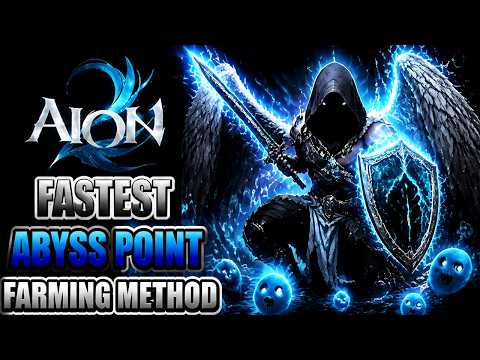
Why it works: a callout hook ("You're using the WRONG…") triggers curiosity and doubt. Short, punchy, and speaks directly to Templar players. This is the pattern to reach for when you want maximum reach.
Why it works: the "ULTIMATE GUIDE" framing plus specific build names (PvP, PvE, Berserk) captures search intent. This is evergreen pillar content that keeps pulling views over time. Title in ALL CAPS with a // separator packs two keyword phrases into one line.
📋 Apply the full tag + description + analytics formula from Video 1 above to build this one out.
Why it works: a big, concrete result ("1 Million AP in 2 Hours") is an irresistible click. First-person "I did X" framing feels like a story, not a lecture. Great for showcasing mechanics in an entertaining way.
📋 Apply the full tag + description + analytics formula from Video 1 above to build this one out.
Video ideas that follow the meta
The three winning patterns above, turned into a repeatable idea generator.
The Callout
"You're Using the WRONG ___" — challenge a common habit. High curiosity, high reach.
The Ultimate Guide
"___ ULTIMATE GUIDE // Best Build" — evergreen, search-friendly pillar content.
The Big Result
"I Did ___ in ___ Time" — a concrete, impressive outcome makes the click irresistible.
The Tier List
"Best ___ Ranked" — rankings spark debate and comments, which boost the algorithm.
Get the gear
Every app in the workflow, where to download it, and what it costs. Prices in USD, accurate as of early 2026 — always check the site for the latest.
SteelSeries GG
Capture & auto-clip your 1080p gameplay (Moments).
Free with SteelSeries GG software.
Download →CapCut
Edit Shorts (9:16) and long-form (16:9) in 1080p.
Free tier available. Pro: $19.99/mo or $179.99/yr. Note: prices rose sharply in early 2026.
Download →YouTube Studio
Upload, A/B test titles (Test & Compare), tags, category.
Free with any YouTube account.
Open Studio →vidIQ
Thumbnails, keyword research, and optimization.
Free tier available. Boost: $19/mo (~$16.58/mo billed yearly, $199/yr). Max: $49/mo.
Get vidIQ →💡 Budget snapshot: You can run this entire workflow on $0 using free tiers of every tool. Going all-in with CapCut Pro + vidIQ Boost runs roughly ~$39/month.